HappyHorse 1.1 vs 1.0: What Changed, What Each Costs, Which to Use
Alibaba's HappyHorse 1.1 against 1.0: per-second prices on WaveSpeed, the features each version has, same-prompt comparisons, and what we measured running 1.1 ourselves.
 HappyHorseAI
Use HappyHorse 1.1 for anything you generate from text, a picture or reference images: it follows long prompts better, keeps several characters apart, adds a cheap 480p tier and an extend endpoint, and its 1080p is cheaper than 1.0's. Keep HappyHorse 1.0 for one job only: editing footage you already have (restyling a clip, swapping an object), because Alibaba has not released a 1.1 version of video edit.
A lot of what ranks for "happy horse 1.1" today is a launch announcement, or a page that treats 1.0 and 1.1 as the same model. They share a name and an API shape, but the price list and the feature set are different. Below is what each costs on WaveSpeed (checked November 11, 2026), what Alibaba says changed, two same-prompt comparisons, and what we measured running 1.1 on HappyHorseAI. Our timings are single runs, not a benchmark.
HappyHorse 1.1 vs 1.0 at a glance
| HappyHorse 1.1 | HappyHorse 1.0 | |
|---|---|---|
| WaveSpeed price per second | $0.07 at 480p, $0.14 at 720p, $0.18 at 1080p | $0.14 at 720p, $0.24 at 1080p |
| A 5-second clip | $0.35 / $0.70 / $0.90 | $0.70 / $1.20 |
| Lengths | 3 to 15 s | 3 to 15 s |
| Text to video | Yes, 9 aspect ratios | Yes |
| Image to video | First frame only | First frame only |
| Reference images | 1 to 9 | 1 to 9 |
| Extend a clip | Yes | No |
| Edit a clip | No | Yes, $0.28 or $0.48 per source second |
| Sound | Generated with the picture | Generated with the picture |
Prices come from the WaveSpeed pages for 1.1 text to video, 1.0 text to video and 1.0 video edit. Alibaba's own list prices on Model Studio are in yuan and follow the same pattern: 720p is the same for both versions and 1080p dropped from ¥1.6 to ¥1.2 a second with 1.1, per Alibaba Cloud's developer community.
On HappyHorseAI, HappyHorse 1.1 costs 14 credits a second at 480p, 28 at 720p and 36 at 1080p. The default 5-second 720p clip is 140 credits.
What Alibaba says changed in 1.1
Alibaba Cloud Model Studio's official prompt collection lists five upgrades over 1.0. In their words, condensed:
- Motion. Better temporal consistency, smoother and more forceful action.
- Multi-reference consistency. Characters from different reference images no longer bleed into each other, and a 3x3 storyboard sheet stays consistent from panel to panel.
- Long instructions. One prompt can drive six to eight sequential shots, and spatial relationships between several characters are more accurate.
- Fidelity. More natural skin and facial detail, especially in close-ups.
- Audio. Dialogue pacing, pauses and ambient effects are generated together with the picture and can be steered, or turned down, from the prompt.
The developer-community write-up adds that 1.1 follows instructions more strictly, reproduces reference images more faithfully (including text and borders in them), syncs lips more precisely and renders faster: about 12 minutes for 15 seconds at 1080p on Alibaba's own service, against about 14 for 1.0. Alibaba lists Mandarin, English and Japanese as the languages it lip-syncs natively.
These are vendor claims. The next section shows two of them on the same prompts.
Same prompt, both versions
Model Studio published both versions' output for several of its prompts, under CC0. We took four frames from each.
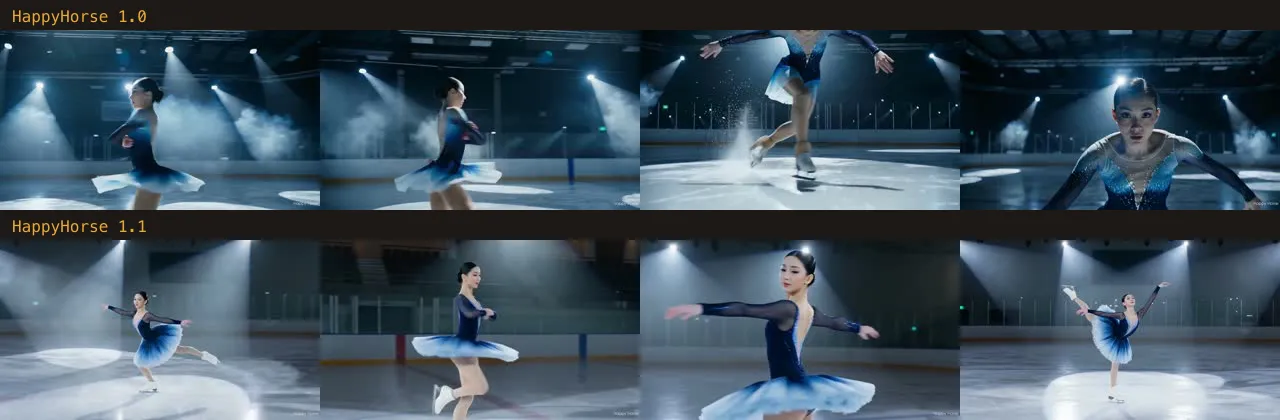
Figure skating, text to video. A 10-second spotlit routine. The 1.0 take crops the skater in two of its four frames; the 1.1 take keeps the full figure in frame through the spin.
A 3x3 storyboard, reference to video. One storyboard image of a rainy night at a corner store: nine panels, a customer and a night-shift clerk. 1.0 stays on the customer for most of its frames. 1.1 works through the panels, including the clerk looking up and smiling, which is the multi-shot claim in practice.
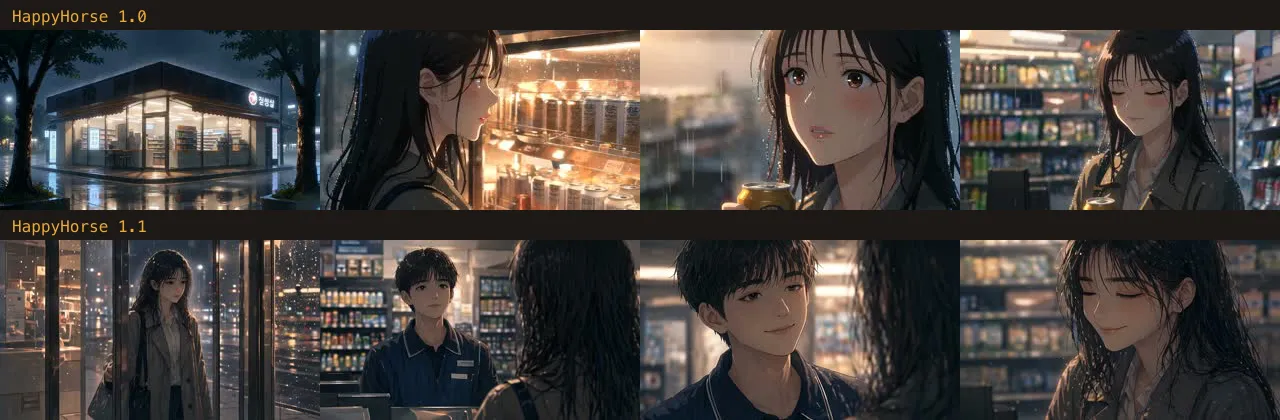
Two pairs are not a benchmark. They do match what Alibaba describes, and they are the kind of prompt where the difference shows: fast bodies and many shots.
What we measured with HappyHorse 1.1
We called each of the four 1.1 endpoints once through WaveSpeed at 480p while building HappyHorseAI:
| Job | Settings | Time to finished clip | Cost |
|---|---|---|---|
| Text to video, a wild herd at sunrise | 21:9, 4 s | 77 s | $0.28 |
| Image to video, a paper koi kite | 3 s | 63 s | $0.21 |
| Two reference images, a ceramic toy horse on a shelf | 16:9, 3 s | 64 s | $0.21 |
| Extend the herd clip by 8 seconds | 8 s added | 118 s | $0.56 |
Every clip came back with a soundtrack: hooves and wind, rustling paper, ceramic clicks and a music-box tune.
Two things we found that the documentation does not say:
- Extend adds seconds; it does not set the total. WaveSpeed's docs describe
durationas the total length of the output. With a 4.1-second source andduration: 8, we got a 12.1-second clip and were billed for 8 seconds. The source stays at the start of the result. Price an extension by the seconds you add. - No watermark on WaveSpeed's output. Alibaba's own API stamps "Happy Horse" in the corner by default (you can see it on Model Studio's examples). The clips WaveSpeed returned to us were clean.
Our extension of a 21:9 clip also came back reframed to 16:9, so plan to extend clips that are already 16:9 if the shape matters.
Wide aerial shot of a herd of wild horses galloping across a misty highland meadow at sunrise, manes flying, dew spraying from the grass, the camera glides alongside them low over the ground. Thundering hooves, wind and distant birdsong. No text, no logos, no brand names, no people.
Probar este promptTo try the extension, generate a clip first, then attach it and describe what happens next.
Multi-shot prompts: the biggest practical change
The feature that changes how you work is writing several shots into one prompt. Give each beat a timestamp and its own camera and sound, and 1.1 cuts between them inside a single render. Model Studio's bridge-chase example is five beats in 15 seconds:
High-octane action blockbuster motorcycle chase on a collapsing suspension bridge at sunset. Photorealistic, relentless forward momentum, teal-and-orange blockbuster color grade, IMAX-scale spectacle, anamorphic lens flares, practical destruction realism, heavy smoke and golden-orange sunset light. 16:9 widescreen. Characters: The Rider — athletic man in his 30s, black leather jacket, no helmet, focused determined expression, riding a matte-black sport motorcycle. The Gunship — black military attack helicopter with twin side cannons, relentless and low-flying. Location: massive suspension bridge over a bay, abandoned cars scattered across lanes, support cables under stress, sections of roadway cracking. [00:00-00:03] Low tracking shot. The Rider weaves at full speed between abandoned cars. The Gunship drops into frame behind him, cannons spinning up. Steel cables snap overhead with metallic shrieks. Screaming motorcycle engine, rotor thunder closing in. [00:03-00:06] Aerial chase angle. Cannon fire rips twin lines across the asphalt chasing the motorcycle. Cars explode on both sides in fireballs. The Rider leans hard through the explosions, sparks and debris flying past. Cannon thunder, explosions, wind rush. [00:06-00:09] Front crash-zoom. The roadway ahead fractures and tilts upward at a steep angle. The Rider accelerates up the rising section using it as a ramp, engine screaming at redline. Groaning metal, cracking concrete, engine roar building. [00:09-00:12] Slow-motion side wide shot. The motorcycle launches over the collapsed gap, suspended mid-air against the burning sunset sky. The bridge section falls away beneath him. The Gunship roars past below. Music drops to silence — only wind rush and distant groaning steel. [00:12-00:15] Hard cut to rear tracking shot, normal speed. The Rider lands brutally on the far section — suspension compresses violently, sparks from the undercarriage. He stabilizes and accelerates toward the bridge exit as the entire span collapses into the bay behind him in a massive structural crash. Driving percussive orchestral score slams back in on landing. Splash and grinding metal behind. Realistic vehicle physics and suspension compression on landing. Accurate destruction debris and water simulation. Stable character and motorcycle design throughout — no morphing, no deformation. Coherent high-speed motion. No text, no watermarks, no subtitles on screen.
Probar este promptThat is Model Studio's prompt as published (CC0). Budget-wise, a 15-second 720p render is 420 credits on HappyHorseAI ($2.10 upstream), so draft the shot list at 480p (210 credits) first.
When to use which version
- HappyHorse 1.1 at 480p: testing prompts and shot lists. Half the price of 720p, and the motion reads the same.
- HappyHorse 1.1 at 720p or 1080p: the keeper. 1080p on 1.1 ($0.18 a second) costs a quarter less than on 1.0 ($0.24).
- HappyHorse 1.1 with references: characters, products or a storyboard sheet you want to keep consistent.
- HappyHorse 1.1 extend: a shot that ends too early. You pay only for the added seconds.
- HappyHorse 1.0 video edit: changing footage you already have. Note that it bills by the length of the source clip, minimum 3 seconds, at $0.28 a second at 720p.
- Neither, for a fixed last frame: both versions take an opening frame only. If the shot must end on a specific picture, use a model with first-and-last-frame support. On HappyHorseAI that is MiniMax H3 Lite in the model menu.
Limits worth knowing
- Release status. Both versions are on sale. Alibaba has not announced an end date for 1.0.
- No last frame, no 1.1 edit. Covered above.
- Prompt length. Alibaba documents 5,000 non-Chinese or 2,500 Chinese characters; anything longer is cut silently and still billed.
- Languages. Lip sync is native in Mandarin, English and Japanese, per Alibaba. Other languages may be voiced less cleanly.
- Open weights. We could not find official open weights for 1.1. Pages calling it open source usually mean 1.0 projects or wrappers; check the source before you rely on it.
FAQ
What is HappyHorse 1.1? Alibaba's video model that generates picture and sound together: 3 to 15 seconds at 480p, 720p or 1080p, from text, an opening image, up to nine reference images, or an existing clip to extend.
Is HappyHorse 1.1 better than 1.0? For generating new video, yes, by Alibaba's account and in the two same-prompt comparisons above. For editing an existing clip, 1.0 is the only option.
How much does HappyHorse 1.1 cost? On WaveSpeed, $0.07 a second at 480p, $0.14 at 720p and $0.18 at 1080p. A 5-second 720p clip is $0.70. On HappyHorseAI that is 140 credits.
Is HappyHorse 1.1 free? Not on WaveSpeed or on HappyHorseAI. Alibaba Cloud gives new Model Studio accounts a small free quota, 10 seconds of video at the time of writing.
Does HappyHorse 1.1 have an API?
Yes. Alibaba Cloud Model Studio offers happyhorse-1.1-t2v, -i2v and -r2v; WaveSpeed adds an extend endpoint. Both are asynchronous: submit, then poll for the result.
HappyHorse 1.1 vs Seedance 2.0? Different trade-offs, and the prices move often. This post compares the two HappyHorse versions only; we will cover other models separately with our own test runs.